
April 23, 2026
Hi Folks,
We made a slight change to the geolocation options when accessing the Gale databases via OSLIS, so here’s a heads up and additional information.
Geolocation Options
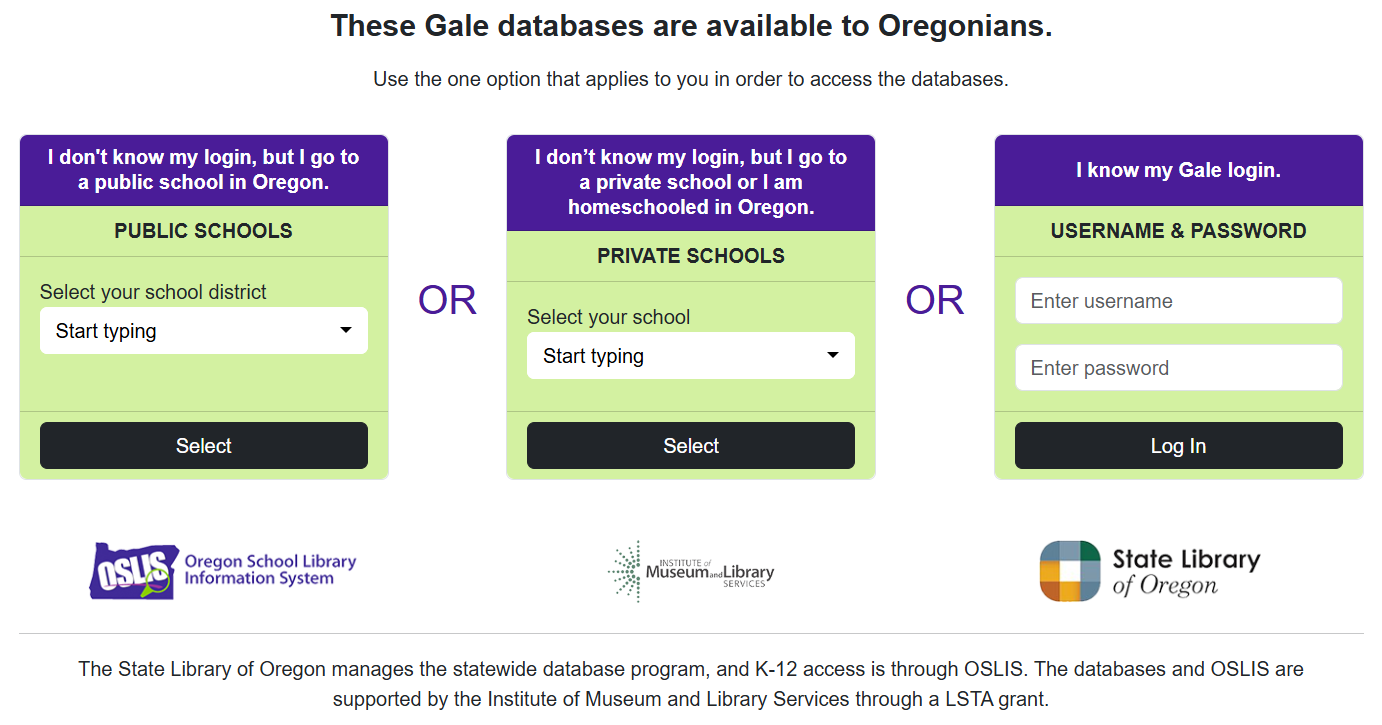
Geolocation is the ability to determine the geographical location of an Internet-connected device. Gale uses it when someone wants to access a Gale database from the elementary or secondary Find Information page on OSLIS when away from school. Geolocation detects that someone is in Oregon, and a page with three authentication options appears – either enter your login, the name of your school district, or the name of your private school. (If not in Oregon when accessing the databases, first a page comes up prompting for the login or for the city and county where the Oregon user lives.) No information that identifies the individual can be detected, and cookies will only last two days. Since it is not necessary to know the Gale login to access the databases, some library staff do not share the login with students and staff. Given that, I asked Gale staff to move the login prompt to the end of the row of authentication options when they made accessibility updates to the geolocation page recently. See the screenshot at the end of this email.
Still Register IP Addresses with Gale
Geolocation is a way to help students who are using the Gale databases on OSLIS when away from school. The best authentication option for accessing the databases when at school is to register your school’s or district’s external, static IP addresses with Gale. Once your IP addresses are on file, users who are at school will get directly into the Gale databases without being prompted to log in. You can send the list of IP addresses to me, or register them yourself by filling out the form on the Authentication & Access page of the Gale support site for Oregon library staff. Be sure to include your location ID, which is the Gale username portion of your login. Need that? Please ask me.
Tip: Incognito or Private Mode A library staffer asked me if there was a way to get the Gale geolocation page to show at school even though you have IP address (instant) authentication – so you can show students what to expect when accessing the databases from home. The answer is yes, and the easiest way to do that is to use your browser’s private or incognito mode which does not track cookies, logins, etc. FYI, using private or incognito mode is also a good way to test the share and edit settings for a Google doc or folder URL to make sure you really did make the setting “anyone with this link can view” or “…can edit” before sharing the URL with others.
Why Require Authentication? (Added this on 4/28/26)
Some may wonder why we still require authentication if Gale can recognize when users are in Oregon. The reason is so we can attribute usage to the correct school district or private school since some track statistics.
If you have questions, please ask.
Best,
Jen
Jen Maurer
School Library Consultant
State Library of Oregon
Screenshot of Updated Geolocation Page
P.S. Don’t forget about the webinar on May 6th from 3:30 to 4:00 pm Pacific – Supporting Accessibility with Gale Resources. All Oregon library staff and other educators are welcome to attend.
| Educator Content There is currently no educator content for this page. |
|
Do you want to share this page with students, but you don't want students to see the Educator Content section? Share this link instead of the URL at the top of the page: |